AI Assistant
An AI Assistant that knows your restaurant
Ask about your sales, send a photo of your menu or ask for a change. The AI Assistant in the back office does the work, and you approve each change.
It uses AI to understand the question. The numbers come from Resto’s reports.
How did last week go? Show me sales by day.
Working on it… Read sales by weekday2 steps · Read sales by weekday · Compared with the week before
Sales were 2.636.550 kr., 4.6 % more than the week before. Saturday was the biggest day.
| Item | Qty | Sales |
|---|---|---|
| Plokkfiskur | 184 | 605.360 kr. |
| Lambalæri | 97 | 484.030 kr. |
| Bleikja | 88 | 351.120 kr. |
Download it as Excel.
sales-21-27-09.xlsxExcel · 7 rows · CSV included
Here is the new lunch menu. Update the system.
Working on it… Read the photo2 steps · Read the photo · Compared it with the menu
I found three changes. Each change gets its own card.
Update menu item
- Item
- Plokkfiskur
- Price
- 3.290 → 3.490 kr.
Update menu item · PlokkfiskurApproved
Update menu item
- Item
- Fiskur dagsins
- New name
- Bleikja dagsins
Update menu item · Fiskur dagsinsApproved
Create menu item
- Item
- Kjötsúpa
- Price
- 2.490 kr.
- Category
- Lunch
- VAT
- 11 %
Create menu item · KjötsúpaApproved
Done. The changes are on every POS.
Add nutrition and allergens to Plokkfiskur. The recipe is 400 g haddock, 300 g potatoes, 80 g onion, 200 ml milk, 30 g butter and 25 g flour.
Working on it… Looked up the food data and barcodes3 steps · Looked up the food data and barcodes · Added up the ingredients · Calculated energy and salt
| Ingredient | Source | Allergens |
|---|---|---|
| Haddock | Barcode | FISH |
| Potatoes | Food data | – |
| Onion | Food data | – |
| Milk | Barcode | MILK |
| Butter | Barcode | MILK |
| Flour | Barcode | GLUTEN |
| Per 100 g | Value |
|---|---|
| Energy (calculated) | 409 kJ / 97 kcal |
| Fat | 3.3 g |
| of which saturates | 2.0 g |
| Carbohydrate | 8.2 g |
| of which sugars | 1.5 g |
| Protein | 8.7 g |
| Salt (calculated) | 0.14 g |
| Fibre | Not available |
The sources have no fibre value, so I left it empty. Please check the values before you publish them.
Update menu item
- Item
- Plokkfiskur
- Nutrition
- 7 values per 100 g
Update menu item · PlokkfiskurApproved
Update menu item
- Item
- Plokkfiskur
- Allergens
- Fish, milk, gluten
Update menu item · PlokkfiskurApproved
Done. The allergens show on the POS and the kiosk.
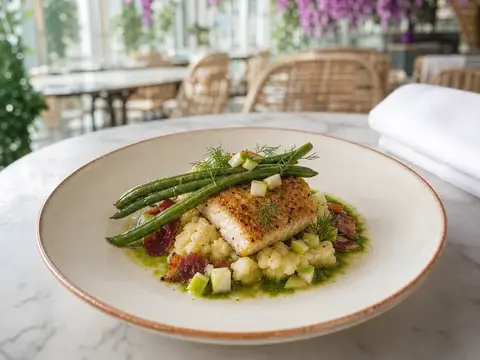
Put this photo on Bleikja.
I will add the photo to Bleikja. The photo shows on the POS, the kiosk and online ordering.
Import image from attachment
- Item
- Bleikja
- Image
- IMG_2057.jpg
Import image from attachment · BleikjaApproved
Done. Bleikja now has a photo.
Go through our setup and tell me what is wrong.
Working on it… Reviewed the setup2 steps · Reviewed the setup · Read the menu items
I found five things to check. The most important are at the top.
- HighKjötsúpa is on online ordering but costs 0 kr.
- HighNo fallback kitchen station is set.
- HighThe modifier group “Sauces” has no options.
- MediumThree items have no English name: Kleina, Skyr and Pylsa.
- MediumTwo items have the same name: “Fries”.
Update menu item
- Item
- Kjötsúpa
- Price
- 0 → 2.490 kr.
Update menu item · KjötsúpaApproved
Done. Kjötsúpa now costs 2.490 kr. on every channel.
We are out of kleinur. Put them on the 86 list. On Sundays we now close at 21:00.
I will mark Kleina as sold out and change Sunday hours to 11:00–21:00.
Set out of stock
- Item
- Kleina
- Status
- Sold out
Set out of stock · KleinaApproved
Update business hours
- Day
- Sunday
- Open
- 11:00–22:00 → 11:00–21:00
Update business hours · SundayApproved
Done. Kleina shows as sold out on every POS. On Sundays you are open until 21:00.
Make drinks print at the bar, not in the kitchen.
Working on it… Read printers and stations1 step · Read printers and stations
The category Drinks now goes to the Kitchen station. I will send it to the Bar station, which prints on the bar printer.
Update prep routing
- Category
- Drinks
- Station
- Kitchen → Bar
- Printer
- Bar (Epson)
Update prep routing · DrinksApproved
Done. The next drinks order prints at the bar.
How do I set up a happy hour on beer?
A happy hour is an automatic discount on items. It applies on the days and at the times you choose. You find discounts here:
Back office › Discounts
I can also set it up for you:
Create discount
- Name
- Happy hour
- Type
- Automatic, on items
- Discount
- 20 %
- Category
- Beer
- Time
- Mon–Thu 16:00–18:00
Create discount · Happy hourApproved
Done. Happy hour starts on Monday at 16:00.
Pick a task on the left, or click “Approve” in the chat.Pick a task, or tap “Approve”.
What it does
It answers, finds mistakes and does the work
It works only with your venue’s data. Everything that changes data waits for your approval.
-
Answers questions
- Sales by item, category, payment type, day or hour
- Comparison of two periods
- Search for orders and payments
- Tables as Excel or CSV files
-
Finds mistakes
- Items with no category or sales channel
- Items at 0 kr. on online ordering
- Missing translations
- Empty modifier groups and duplicate names
- Missing stations, business hours or cash drawers
-
Changes settings
- Items, prices, categories and modifiers
- Discounts and business hours
- Sold-out items (the 86 list)
- Printers and kitchen station routing
- Users, the kiosk and online ordering
-
Fills in product data
- Items from a photo of a menu
- A dish photo on the item
- Nutrition from a recipe
- Allergens, ingredients and translations
Menu from a photo
A new menu from one photo
Take a photo of your paper menu and send it in the chat. The AI Assistant reads the photo and proposes new prices, new names and new dishes.
- 1
It says what it will do
The AI Assistant lists the changes it found in the photo.
- 2
Each change gets its own card
The card shows the item and the new values. You can approve one change and decline another.
- 3
You approve each change
The system itself holds every change until you approve it, not only the AI.
Here is the new lunch menu. Update the system.
Working on it… Read the photo2 steps · Read the photo · Compared it with the menu
I found three changes. Each change gets its own card.
Update menu item
- Item
- Plokkfiskur
- Price
- 3.290 → 3.490 kr.
Update menu item · PlokkfiskurApproved
Update menu item
- Item
- Fiskur dagsins
- New name
- Bleikja dagsins
Update menu item · Fiskur dagsinsApproved
Create menu item
- Item
- Kjötsúpa
- Price
- 2.490 kr.
- Category
- Lunch
- VAT
- 11 %
Create menu item · KjötsúpaApproved
Done. The changes are on every POS.
Try it: approve or decline each card.
Nutrition and allergens
Nutrition from the recipe
You give it the recipe. It finds each ingredient, adds up the values and puts the allergens on the dish.
1Recipe · Plokkfiskur
| Ingredient | Source |
|---|---|
| Haddock400 g | Fish |
| Potatoes300 g | Food composition data0627 |
| Onion80 g | Food composition data0655 |
| Milk200 ml | Milk |
| Butter30 g | Milk |
| Flour25 g | Gluten |
Total 1.035 g
2The 14 allergens in EU law
- GLUTEN
- Crustaceans
- Eggs
- FISH
- Peanuts
- Soy
- MILK
- Nuts
- Celery
- Mustard
- Sesame
- Sulphites
- Lupin
- Molluscs
The allergens come from the product data.
3Nutrition label
Nutrition per 100 g
- EnergyCalculated
- 409 kJ / 97 kcal
- Fat
- 3.3 g
- of which saturates
- 2.0 g
- Carbohydrate
- 8.2 g
- of which sugars
- 1.5 g
- Fibre
- Not available
- Protein
- 8.7 g
- SaltCalculated
- 0.14 g
Calculated with EU 1169/2011
Waiting for approval
- Nutrition · 7 values
- Allergens · fish, milk, gluten
- Product data (barcode)
Packaged products by barcode, sometimes with allergens.
- Food composition data
Nutrition for generic ingredients, from food analysis. No allergens.
- Values from the sources are used as they are.
- Energy and salt are calculated with the EU 1169/2011 formula.
- If a value is missing, it says that the value is not available.
- Each change waits for your approval, and you are responsible for the values.
Security and privacy
Your data stays with your venue
The AI Assistant uses the same access as the staff member who asks. It sees only the data of the selected venue.
-
One venue at a time
Each conversation belongs to the venue selected in the back office. The AI Assistant reads only that venue’s data.
-
Conversations stay with the venue
Conversations are stored with the venue’s data. Each user sees their own conversations and can delete them.
-
Answers only about your venue
The AI Assistant answers questions about the menu, sales, staff and settings. It does not answer general questions.
Frequently asked questions
Which language does it answer in?
Does it work on a phone?
What does the AI Assistant cost?
Book a demo of Resto
We show you the system at a time that suits you. The demo does not commit you to anything.
We read every request and get back to you ourselves. We also answer in the evening and at the weekend.
Thanks.
We will be in touch within one working day.